Tap Color Pro: Color By Number
- 4.6
- Rating
- 50.00M
- Installs
- Free
- Price

 Analysis by App-foxy
I find Tap Color Pro: Color By Number most enjoyable when I treat it as a small daily ritual rather than a game I need to finish quickly. It is a free board game from Tap Color Studio, built around filling numbered areas with matching colors. The basic idea is immediately clear, but the appeal comes from the calm rhythm: choose a color, locate its matching spaces, and watch a detailed picture gradually take shape.
That simplicity makes it easy to recommend to someone who wants a quiet activity on a phone. I can open it while waiting for an appointment, use it for a few minutes before bed, or stay with one picture for longer when I want something more absorbing than scrolling. It is aimed at Everyone, so the presentation is approachable for a broad audience, although younger players may still benefit from an adult checking purchases and screen-time habits.
The game has reached over 50 million installs and holds a 4.6 average from around 218 thousand ratings, which fits my impression that it is designed for mass appeal rather than for experienced strategy players. Its current version is 7.6.9, and it runs on Android 6.0 or later. Those details matter if you are using an older device: compatibility is fairly broad, but the experience will still depend on how smoothly your particular phone handles image-heavy coloring screens.
You May Also Like

 AccuWeather: Weather Radar
AccuWeather Review: A Quick, Clear Forecast for Everyday Decisions
For everyday plans, the best forecast is the one you can understand quickly. AccuWeather makes rain timing, radar, and local conditions easy to act on, with a few trade-offs.

 Hill Climb Racing
Why Hill Climb Racing Still Turns Crashes Into One More Run
A tiny car, a bumpy hill and one more upgrade: Hill Climb Racing keeps resurfacing because its simple chaos makes every near-miss feel personal.

 AliExpress - Shopping App
AliExpress Makes Global Shopping Feel Personal, but Shoppers Bear the Risk
AliExpress turns a global marketplace into a pocket-sized discovery engine. Its reach is useful, its shopping loop compelling, and its trade-offs easy to miss.

 Lords Mobile: Kingdom Wars
Lords Mobile Is a Kingdom-Building Routine, Not a Quick Match
A case-by-case verdict on the building, battles, device demands, and social commitments that make Lords Mobile rewarding for some players and exhausting for others.

 PDF Scanner app - TapScanner
TapScanner Makes Paperwork Easier to Capture, Check, and Share
TapScanner makes scanning with a phone feel less like a rescue operation and more like a dependable step in getting work done. Its capture tools are useful, though not flawless.

 Block Blast!
 Shows How Much a Puzzle Game Can Leave Out
A quiet grid game shows why puzzle players increasingly value instant clarity, repeatable skill and low-pressure play—and where the genre still needs to catch up.
More From Our News Desk
View All News


How the everyday coloring workflow feels
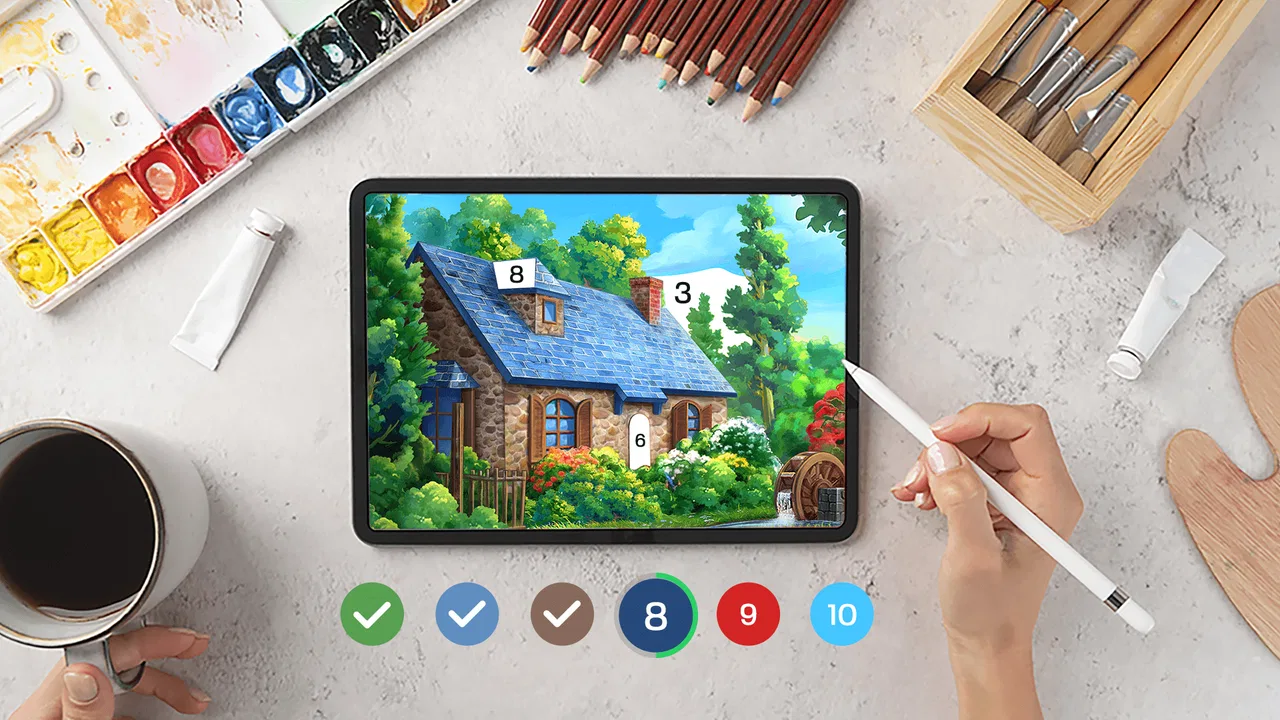
The normal session is wonderfully uncomplicated. I select an image, pick a visible color, and tap the regions marked for that shade. As the correct areas disappear into the finished artwork, the picture becomes easier to read. This gives the game a useful sense of progress even when I only complete a small portion.
I prefer starting with a color that appears in several obvious areas instead of immediately chasing tiny sections. Large regions help establish the image and reduce the visual clutter. Once the picture is more recognizable, I move toward smaller patches and isolated details. This is a simple habit, but it prevents the early part of a drawing from feeling like a hunt through random dots.
When I am playing casually, I do not try to clear every matching space before changing colors. I usually work through the most visible areas, switch when the remaining marks become awkward to find, and return later. That approach feels less tiring than repeatedly scanning the whole image for one last hidden section.
The strongest part of the design is the feedback loop. A correct tap produces a clear sense that the area has been handled, while the remaining numbered sections keep the next action obvious. There is no need to learn a complicated rule set, memorize combinations, or compete against another player. The challenge is mainly visual attention and patience.
That also explains the main limitation. If you want a board game with meaningful decisions, changing tactics, or a strong win-or-lose structure, this will feel too gentle. It is closer to interactive coloring than to chess, checkers, or a puzzle with multiple solutions. I would not install it expecting strategic depth.
A practical routine for short sessions
For a five-minute break, I choose an image with clear, larger sections and concentrate on one color family. I avoid trying to complete an entire picture in that window. The goal is to leave the image in a cleaner state so that returning to it feels welcoming rather than unfinished in a frustrating way.
For a longer session, I divide the picture into zones. I may work through the upper area first, then the center, and finally the edges. This reduces the repeated back-and-forth that happens when I tap a color and search the entire canvas. It also makes it easier to notice a forgotten patch near a border.
One useful habit is to zoom only when the remaining marks become genuinely difficult to distinguish. Constantly enlarging the image makes navigation slower and can make a simple picture feel more complicated. I get better results by keeping the full composition visible while working on broad areas, then using closer inspection for small details.
Another practical point is to pause before tapping rapidly. When several narrow regions sit close together, fast tapping can turn a relaxing activity into a minor accuracy test. Slowing down for those final sections usually saves time because I make fewer accidental taps and spend less time correcting my position.
Settings and controls worth checking
Before settling into a long session, I recommend looking through the available settings and in-game controls rather than accepting the default experience automatically. The most important checks are the ones that affect comfort: sound, notifications, visual feedback, and any assistance offered while coloring. I do not assume every player wants the same level of guidance.
I personally prefer a quieter setup when using the game at night. Removing unnecessary audio makes the coloring feel more like a private wind-down activity, while keeping visual feedback helps me understand whether a tap registered. During the day, I am more tolerant of sound and a busier presentation, especially when I am using the app for a short break.
It is also worth checking how the game presents optional prompts. Free games commonly place extra attention around additional content or purchases, and this one includes in-app items priced from $0.99 to $49.99 each. I would review purchase protections on the device before handing the phone to a child, and I would avoid tapping through offers simply because I want to return to the picture quickly.
That price range does not make the free starting point meaningless, but it does change how I approach the app. I treat paid options as conveniences rather than necessities. If a picture takes longer to complete, I would rather return to it later than spend money just to remove a small amount of friction.
Notifications deserve the same attention. A coloring game does not need to interrupt every part of the day to be useful. If reminders become distracting, I would reduce them or turn them off at the device level. The best use of this app is intentional: I open it when I want a calm activity, not because it keeps pulling me back.
Faster patterns that still feel relaxing
Experienced use is less about tapping faster and more about reducing unnecessary searching. I start by identifying whether the current color is concentrated in one part of the image. If it is, I stay in that area instead of jumping between distant sections. This creates a repeatable route and keeps the picture’s structure in mind.
I also separate broad completion from detail completion. Large shapes are efficient early targets because they quickly reduce the number of visible marks. Tiny decorative sections are better left for the end, when the image has enough color to make their location obvious. Trying to finish the smallest details first is possible, but it usually produces more scanning than progress.
When a color seems to have vanished, I do not immediately assume the game has missed a tap. I check the edges, corners, and areas hidden among similar shades. Small numbered spaces can be visually easy to overlook, especially in a busy illustration. A slow border scan is often more effective than repeatedly selecting the same color and tapping at random.
For people who color regularly, consistency helps. I use the same general order—large areas, central details, borders, then cleanup—so I spend less mental energy deciding what to do next. This is not a formal game mechanic, but it turns a loose collection of taps into a comfortable routine.
Another useful trade-off concerns image choice. A highly detailed picture can provide more to explore, but it also demands more concentration and produces a longer cleanup phase. Simpler images are better for commuting, short breaks, or tired evenings. Detailed designs suit a focused session when I want the activity itself to occupy my attention.
I would not describe these habits as shortcuts that remove the work. They simply make the work more predictable. The satisfaction still comes from filling the picture, and rushing too aggressively would undermine the relaxing quality that makes the game worthwhile.
Where the experience reaches its limits
The biggest limit is repetition. The central action remains the same from one image to the next: select a color and fill its matching spaces. Variety in artwork can keep that loop pleasant, but it cannot turn it into a deeper board game. After several long sessions, I may want a different kind of challenge.
This is also not the right choice for someone who enjoys creating freely with a blank canvas. The numbered format guides every decision, which is helpful when I want structure but restrictive when I want artistic control. A traditional drawing app is better if brush choice, composition, and personal technique are the main reasons I want to create.
Likewise, people who dislike optional purchase prompts should approach the free model carefully. I can enjoy the basic activity without buying anything, but the presence of paid items is still part of the overall experience. Setting a clear personal rule—such as never purchasing during a quick session—helps keep the app aligned with its relaxing purpose.
There is a further difference between using the game on a large, bright screen and using it on a compact or older phone. Small areas are naturally easier to inspect on a larger display. On a smaller device, I rely more on zooming and take more care around edges. The minimum operating-system requirement is Android 6.0, but compatibility alone does not guarantee that every device will feel equally comfortable.
I also would not choose this game for a group activity. It is mainly a personal, focused experience. There is no need for opponents or conversation, which is excellent when I want quiet time but less suitable when I am looking for social competition or a shared board.
Who will get the most from it
I think it suits people who enjoy organized repetition, visual completion, and low-pressure progress. It works particularly well for anyone who wants a simple phone activity that can be paused without losing the basic sense of where they were. The controls are approachable enough for casual players, and the age rating makes the concept broadly accessible.
It can also be useful for parents looking for a calm coloring-style activity, provided they manage device purchases and decide whether notifications are appropriate. I would introduce it as a quiet creative game, not as an educational tool or a replacement for hands-on art materials.
For commuters, the best scenario is a short, interrupted session. I can complete a few sections, lock the phone, and return later without needing to remember a complicated plan. For someone winding down at home, the more detailed pictures provide a longer focus period, although I would keep the screen brightness and notifications comfortable for the time of day.
People who should skip it are those seeking competitive progression, complex puzzles, freehand creativity, or a strong social component. They may be happier with a traditional strategy board game, a dedicated drawing app, or a puzzle that changes its rules from one level to the next.
My verdict after building a repeatable habit
Tap Color Pro: Color By Number works because it does not demand much from me before it becomes enjoyable. I can begin immediately, use a simple area-by-area routine, and stop whenever I want. The best results come from treating its controls and settings as part of a personal workflow: keep the presentation comfortable, choose an image that matches the time available, and use large sections to establish momentum before handling details.
Its free access makes trying it easy, while the optional purchases mean I would keep spending under my own control. The game’s broad audience, long-standing availability since May 29, 2020, and popularity under Tap Color Studio suggest a stable place in the coloring-game category, but popularity does not change its basic nature. This is a focused, repetitive activity, not a strategic board game.
My recommendation is clear but specific: install it if you want a guided coloring routine that feels peaceful and easy to pause. Start with short sessions, check the sound and notification settings, and avoid judging the game by how quickly you finish a picture. If you need competition or creative freedom, choose another category. If you want a dependable way to turn a few spare minutes into calm visual progress, this one earns a place on my phone.
FAQs for Tap Color Pro: Color By Number
01What is Tap Color Pro: Color By Number?
Tap Color Pro: Color By Number is a relaxing coloring app that allows users to create beautiful art by following number patterns. Users can choose from a wide variety of designs, ranging from simple to intricate, and simply tap to fill in each section with the correct color. It's perfect for stress relief and creative expression.
02Is Tap Color Pro free to use, or are there in-app purchases?
Tap Color Pro is free to download and offers a selection of free designs to color. However, it also includes in-app purchases for additional coloring packs and premium features, such as ad-free experiences and a wider selection of designs. Users can choose to purchase these extras if they wish to expand their coloring options.
03Can I use Tap Color Pro offline?
Yes, Tap Color Pro can be used offline, allowing you to enjoy coloring without an internet connection. However, you will need an internet connection to download new coloring packs and to access certain features, such as daily updates or sharing your completed artwork on social media.
04Are there any social features in Tap Color Pro?
Yes, Tap Color Pro includes social sharing features that allow users to share their completed artwork with friends and family on platforms like Facebook, Instagram, and Twitter. This app fosters a community of users who enjoy showcasing their creativity and connecting with others through their art.
05What devices are compatible with Tap Color Pro?
Tap Color Pro is available on both Android and iOS devices, making it accessible to a wide audience. The app is optimized for smartphones and tablets, ensuring a smooth and enjoyable user experience regardless of the device you use. Check your device's app store for compatibility and download options.
Pros
- Simple and intuitive user interface.
- Wide variety of illustrations to color.
- Regular updates with new content.
- Offline mode available for coloring anytime.
- Relaxing music to enhance the experience.
Cons
- Ads can be frequent and intrusive.
- Some images locked behind a paywall.
- Occasional app crashes reported.
- Limited free hints for complex areas.
- Battery consumption is relatively high.

Tap Color Pro: Color By Number
Gallery